This page has some common access issues that PEDSnet external collaborators run into. Please read through to see if any of these suggestions can help solve your issue. If you still run into problems after referencing this guide, you can fill out this REDCap survey, and someone from the PEDSnet Coordinating Center will be in touch.
Forgot CHOP ID password
If you have forgotten your CHOP ID password, you can try to reset it by visiting https://manualpasswordreset.chop.edu.
If that does not work, please call the CHOP IS Help Desk at 215-590-4357. Business hours at 8:30 am - 5 pm EST, Monday - Friday.
Sometimes, certain CHOP IS support staff will say they cannot help you. That is not accurate. If you get someone who says this, you can hang up and call back and you should receive another agent. If you continue to run into this issue with the help desk, you can reach out to the Coordinating Center at pedsnet@chop.edu
Atlas won't load or won't let you log in
Atlas works best on Firefox and Chrome browsers. If you know your username and password are correct but you're having login issues, try clearing your cookies and browser cache.
If the problem persists, try accessing Atlas in an incognito browser.
Getting a log-in error from one of the apps (RStudio, ATLAS, etc.) when you know your username and password
You may be entering your CHOP ID wrong!
When you see this initial Microsoft screen, you should enter chopid@chop.edu (e.g. byrnec@chop.edu) and then your password

After getting past this Microsoft screen, you should only enter your CHOP ID without the @chop.edu (e.g byrnec)
Please make sure you are logging in with your CHOP account, and NOT your institutional Microsoft account!
'Cannot Connect to R Session' error message

If you receive this error message after you have entered your CHOP ID and password, please fill out the REDCap help form. This is not a login issue, you just need to be added to the correct home directory.
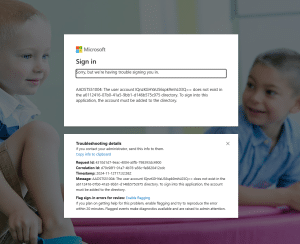
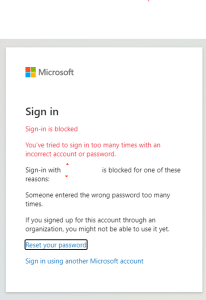
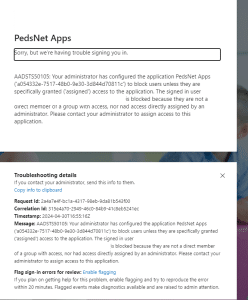
Error messages that require you to fill out the REDCap form and contact the Coordinating Center
Below are some screenshots of error messages that warrant filling out the REDCap help form. The form will ask you to include your own screenshot, so the Coordinating Center can help diagnose your issue.